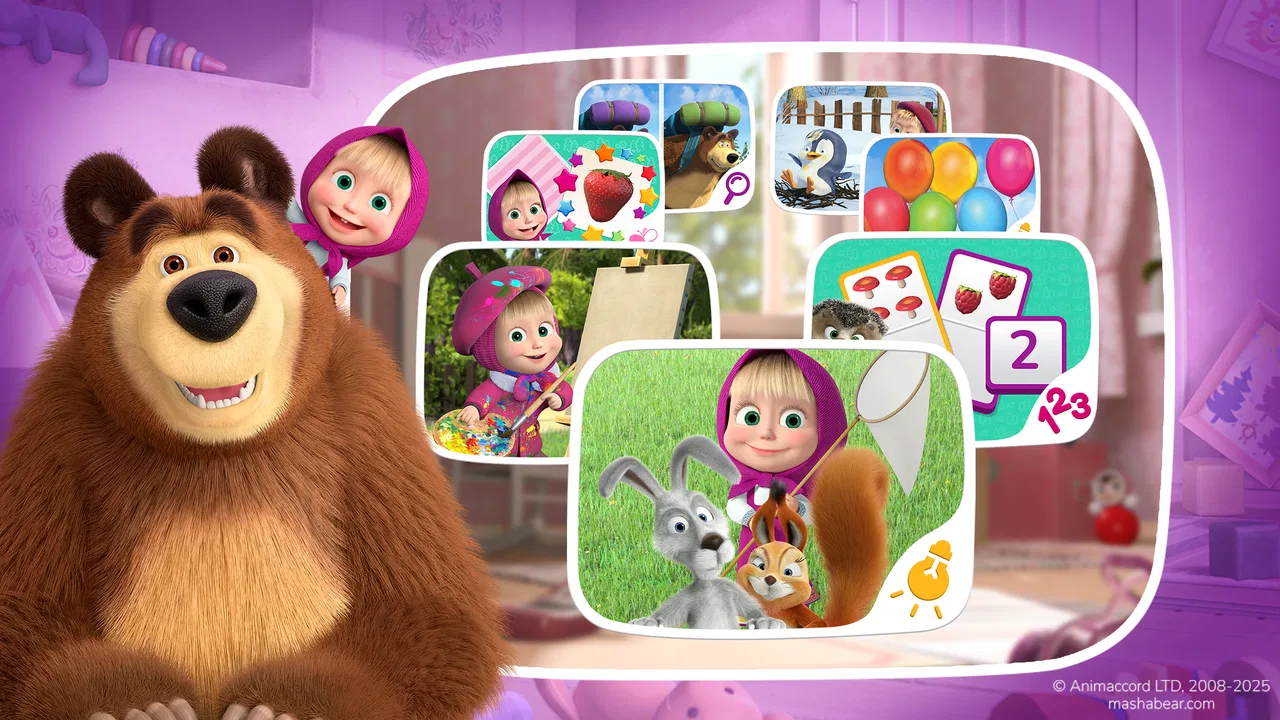
Masha and the Bear Educational
- 4.4
- Rating
- 100.00M
- Installs
- Free
- Price

 Analysis by App-foxy
When I want a young child to use a phone or tablet for something more purposeful than passive video, Masha and the Bear Educational is one of the easier choices to understand. It turns the familiar Masha and the Bear world into a collection of simple learning activities, so the child gets recognizable characters, playful tasks, and a gentle introduction to educational play rather than a formal lesson. I tested it with the mindset of a parent handing over a shared device, and my overall impression is that it works best as a short, supervised activity that can fit naturally into a household routine.
The game is free to install and is listed for Everyone, which makes it approachable for families looking for child-friendly entertainment. It belongs to the educational game category and comes from DTC Lab. Its average rating is 4.4 from around 309 thousand ratings, while its reach has grown beyond 100 million installs. Those figures suggest that it has become a familiar option for families, but popularity alone is not enough for me: the important question is whether it behaves well in the real moments when a child wants the tablet and an adult is nearby trying to keep the experience calm and useful.
How it fits into a shared household
The most convincing use case is a shared phone or tablet used during a small gap in the day. A child might play while waiting for dinner, during a quiet morning, or while an adult finishes a short task nearby. The Masha and the Bear theme gives the child an immediate point of interest, and the educational framing makes the activity feel more intentional than opening an endless video feed. I would not treat it as a replacement for books, conversation, drawing, or hands-on play, but it can be a practical bridge between those activities.
You May Also Like

 Blood Strike: 2.5 Anniversary
Blood Strike’s Loadouts Turn Every Drop Into a Tactical Gamble
A close look at Blood Strike’s custom loadouts: how fast access to signature weapons reshapes its battle royale rhythm, rewards preparation, and narrows the gap between fights.

 Pandora - Music & Podcasts
Pandora’s Music Is Easy to Start, but Harder to Recover
Pandora’s strength is its low-effort path from a seed to a station. Its weak spot is how much confidence it asks you to place in connection, setup, and quiet recovery.

 8 Ball Pool
8 Ball Pool Is Built on Rivalries, Rematches, and Routine
A close look at the rivalries, rematches, shared routines, and unanswered safety questions that turn a quick pool match into a persistent mobile community.

 Samsung Music
Samsung Music’s Quiet Strength Is Playing What You Already Own
Its reach comes less from spectacle than from dependable access to a personal library. That simplicity is both the app’s strongest retention engine and its ceiling.

 AccuWeather: Weather Radar
AccuWeather Review: A Quick, Clear Forecast for Everyday Decisions
For everyday plans, the best forecast is the one you can understand quickly. AccuWeather makes rain timing, radar, and local conditions easy to act on, with a few trade-offs.

 Hill Climb Racing
Why Hill Climb Racing Still Turns Crashes Into One More Run
A tiny car, a bumpy hill and one more upgrade: Hill Climb Racing keeps resurfacing because its simple chaos makes every near-miss feel personal.
More From Our News Desk



On a shared device, the first thing I would do is open the game myself before giving it to a child. That is not because the experience is difficult, but because a parent should know how the opening screens, activity choices, and any purchase prompts fit together. The game is free, yet it includes in-app purchases ranging from $1.99 to $64.99 per item. That makes a quick adult check especially sensible when the device is also used by older children or other family members.
I also prefer to decide in advance whether the child is allowed to explore freely or whether I am choosing one activity at a time. Younger children often tap whatever looks most colorful, and that is part of the fun, but an adult can make the session more manageable by setting a simple boundary: one short play period, then a break; or one activity followed by another non-screen task. This approach keeps the game from becoming an automatic fallback every time the child is bored.
A useful household routine is to keep the device in a common area rather than treating it as a private toy. I can sit beside the child for the first session, ask what the characters are doing, and notice whether the child understands the task without help. That gives me better information than relying on the age label alone. If the child becomes frustrated, repeatedly taps without understanding, or loses interest quickly, the issue may be the timing or the activity rather than the child’s ability.
What the first session tells a parent
The first session is a good opportunity to check three practical things. First, can the child recognize what to do without constant instructions? Second, does the child enjoy trying again after a mistake? Third, can the child stop when the agreed time is over? These questions matter more than whether the game keeps a child occupied for a long stretch. An educational game has value when it encourages attention and experimentation, not simply when it holds the screen.
I would also watch how the child uses the device physically. If the screen is small, tiny controls may be tiring for younger fingers. If the tablet is heavy, the child may need it placed on a table rather than held. These are ordinary setup details, but they influence whether the game feels inviting or frustrating. Because the experience is designed around familiar animated characters, it can encourage a child to keep trying, but that does not remove the need for a comfortable screen position and a distraction-free setting.
For a family with several children, shared use needs a little coordination. One child may want to choose every activity, while another may want to repeat the same favorite task. I find it works better to agree on turns before opening the game. A simple “you choose first, then your sibling chooses” rule prevents the application from becoming the source of an argument. The game itself cannot solve every household disagreement, so the adult routine around it matters.
Setup boundaries before handing over the device
Because the game is free to download but offers purchases, I would never assume that a child can use a shared device without an adult checking the purchase settings first. The safest habit is to handle any download or purchase decisions personally and avoid giving a child access to a payment method. This is not a criticism unique to this title; it is simply a sensible boundary for any children’s game with optional paid content.
I would also avoid signing a child into an adult account for convenience. A shared device often contains email, photos, shopping applications, or other personal information, and a child does not need access to those areas to enjoy a learning game. If the household uses separate device profiles, that separation is preferable. If it does not, the adult should open the game, close unrelated applications, and remain close enough to intervene when the session ends.
The operating-system requirement is Android 8.0 or later, so compatibility should be checked before planning to use it on an older handset or tablet. That matters in families that pass devices from one person to another. A child may receive an older device that still works well for reading or video, yet the game may require a newer system. Checking the device first avoids turning the download into a frustrating family project.
The current version is 9.5.8. I would still look at the application’s store page on the particular device before installing, since updates and compatibility can change over time. Once it is installed, I prefer to launch it while connected to the household’s normal network and make sure it opens properly before a child needs it during a busy moment. A little preparation is worthwhile when the device is being shared.
Keeping the activity contained
One of my practical tips is to create a clear beginning and ending for every session. Instead of handing over the tablet with no limit, I might say, “We are going to play until this activity is finished, then we will put it away.” That gives the child a concrete stopping point. If the child is too young to judge time, a visible kitchen timer or a spoken routine can help, but the adult should introduce that expectation before play becomes absorbing.
Another useful approach is to pair the game with a conversation. After an activity, I can ask the child to explain what happened, name a character, or describe which part was easy. This turns screen time into a shared exchange rather than an isolated block. It also reveals whether the educational content is actually being understood. A child who can explain a task may be getting more from it than a child who is only tapping rapidly to see the next animation.
I would not use the game as a reward for every ordinary behavior, because that can make the screen feel more valuable than the learning itself. It is better suited to a predictable routine: a brief activity after breakfast, a quiet option while waiting, or a shared parent-child session. The familiar theme can make the invitation easy, but the household still decides how prominent the game becomes.
Coordinating play between children and adults
In a home with more than one child, the game is easiest to manage when the adult coordinates access rather than expecting the application to do it. Younger children may need help interpreting a task, while older children may move through it more quickly. I would give each child a defined turn and encourage the older one to explain rather than take over. That creates a small learning opportunity for both children and reduces the temptation to let the most confident player control the entire session.
Shared-device use also raises the question of progress. I would not promise that every child will have a separate experience unless the device and game clearly support that arrangement. Instead, I would treat the game as a group activity when several children are watching. One child can tap while another predicts the answer, identifies objects, or tells the story in their own words. This works particularly well when the adult wants to keep the session social.
For a single child, I would pay attention to whether repetition is productive. Repeating an activity can help a child build confidence and notice patterns, but endless repetition may simply mean the child has found the most comfortable button sequence. A parent can gently vary the conversation: ask the child to slow down, describe the choice, or try a different activity. That small intervention makes the experience more thoughtful without turning play into a test.
The game is also a reasonable option for an adult and child to use together. A parent who is unfamiliar with children’s educational games can sit beside the child and follow the child’s lead. Masha and the Bear provide a recognizable setting, so the adult does not need to invent a complicated lesson. I like this shared approach because it lets the parent judge the tone, difficulty, and suitability directly instead of assuming that a child-friendly label answers every question.
Where it differs from common alternatives
Compared with a standard video application, this game offers more opportunity for the child to make a choice and respond to a task. That makes it a better fit when I want active participation rather than simply watching an episode. Compared with a serious learning platform built around structured lessons, it is more relaxed and character-led. It is unlikely to satisfy a parent looking for detailed progress tracking, formal curriculum alignment, or a carefully sequenced study plan.
That difference is important. The game’s strength is approachability: the child may be willing to try because the world feels familiar and playful. Its trade-off is that a parent looking for measurable academic practice may find the experience too light. For early learning and casual reinforcement, I prefer this kind of low-pressure format. For deliberate reading instruction, mathematics practice, or schoolwork support, I would choose a specialized educational tool instead.
Another distinction is the role of the adult. A video can be left playing in the background, while an educational game benefits more from occasional conversation and observation. If a family wants something that requires no involvement at all, this may not be the best choice. The app can be simple to start, but its real value improves when the adult notices what the child is learning and connects it to everyday life.
Age, trust, and the limits of the label
The Everyone content rating makes the game a plausible choice for a broad family audience, especially younger children who already enjoy Masha and the Bear. I still would not treat that label as a complete substitute for supervision. Children of the same age can differ widely in reading ability, attention span, sensitivity to sounds, and tolerance for mistakes. The right question is not only whether the game is permitted for the child’s age, but whether the child can use it comfortably and stop without a struggle.
Trust on a shared device also depends on the adult’s boundaries. I would explain that the child may use the game but should not open other applications, press purchase buttons, or change device settings. Those rules are easier for a child to follow when they are stated positively and repeated calmly. The game becomes part of a trusted routine rather than an unsupervised doorway into everything stored on the tablet.
Parents should also consider whether the child is likely to confuse fictional play with real-world expectations. Masha and the Bear offer an entertaining setting, but the child may still need help separating the game’s playful logic from ordinary behavior. I like using the characters as conversation starters: what was kind, what was silly, what would you do differently? That keeps the application connected to family values without pretending it is a complete social or emotional curriculum.
For very young children, I would begin with short sessions and stay nearby. For a child who already reads independently, the game may feel too easy or repetitive unless the child enjoys the characters. For children who dislike bright animation or prefer open-ended creative tools, a drawing application, physical puzzle, or book may be a better match. The game is not trying to serve every learning style, and that is fine; the decision should follow the child rather than the popularity of the title.
When I would choose something else
I would skip this game if my main goal were a detailed record of a child’s progress. I would also look elsewhere if I needed a tightly controlled lesson sequence, substantial reading practice, or advanced problem solving. Its approachable style is an advantage for casual learning, but it also means that families seeking academic depth may outgrow it quickly.
I would be cautious about installing it on a device that a child uses completely alone if the household has not reviewed purchase access and account boundaries. The free entry point is convenient, yet optional purchases make adult preparation necessary. I would also choose another activity when the child is already overstimulated or tired. Familiar characters can attract attention, but they cannot make a poor moment for screen use suddenly ideal.
Finally, I would not use it as a substitute for interaction. A child can learn through play, but the strongest results often come when the adult asks questions, celebrates effort, and connects the activity with objects or situations outside the screen. If the household is looking for a quiet shared experience rather than a digital babysitter, this game fits better.
My household verdict
After looking at it as a shared-device game rather than merely a children’s download, I see a clear place for it in a family routine. It is free to start, easy to recognize, and gentle enough to introduce educational play without making the child feel as though school has followed them home. The Masha and the Bear theme gives it an advantage over anonymous learning drills, especially for children who respond to familiar characters.
My recommendation comes with boundaries: an adult should check the device first, keep purchase access under control, set expectations for turns and stopping, and stay available during the early sessions. Those steps are not burdensome, and they make the experience more predictable for everyone. On a shared tablet, I would use it in a common room and treat it as one option among books, toys, conversation, and outdoor play.
At the time of my review, the game’s broad reach, 4.4 average, and Everyone rating make it easy to understand why many families consider it. Still, I would judge it by the child in front of me. If that child enjoys the characters, responds well to short activities, and benefits from a little adult conversation, it can be a worthwhile addition. If the goal is advanced instruction, detailed monitoring, or completely independent use, another educational option will probably serve the household better.
For me, the best way to recommend it to a friend is this: install it as a supervised, low-pressure learning game, not as an all-purpose solution. Give the child room to explore, but keep the account and purchase boundaries with the adult. Used that way, Masha and the Bear Educational offers a friendly balance between entertainment and early learning, with enough flexibility for a shared family device and enough limitations that parents should remain part of the experience.
FAQs for Masha and the Bear Educational
01What educational content does Masha and the Bear Educational offer?
Masha and the Bear Educational app is designed to engage children with interactive learning activities. It offers content focused on basic math, language skills, and problem-solving. Through mini-games and challenges, children can learn numbers, letters, and logic in a fun and engaging way, inspired by the beloved cartoon characters.
02Is Masha and the Bear Educational suitable for all age groups?
The app is primarily designed for preschoolers and early elementary school children, typically ages 3 to 7. It focuses on foundational skills appropriate for young learners. Parents should assess if the content aligns with their child's learning level, as older children might find it less challenging.
03Does the app require an internet connection to use?
Masha and the Bear Educational can be used offline, making it convenient for travel or situations without internet access. However, some features, such as updates or additional downloadable content, may require an internet connection. Ensure you have access to Wi-Fi for these updates.
04Are there any in-app purchases or ads in Masha and the Bear Educational?
The app offers a free version with limited features and may include ads. For an ad-free experience and access to all educational content, there is a premium version available via in-app purchase. Parents should consider this if looking to maximize the learning potential without interruptions.
05How can parents track their child's progress in the app?
Masha and the Bear Educational includes a feature for parents to monitor their child's progress. Through a dedicated section, parents can view completed activities, strengths, and areas needing improvement. This helps in guiding the child's learning journey and adapting it to their individual needs.
Pros
- Engaging educational content for kids.
- User-friendly interface for easy navigation.
- Colorful graphics capture children's attention.
- Includes mini-games for interactive learning.
- Supports multiple languages for diverse users.
Cons
- Limited offline functionality limits use.
- In-app purchases can be distracting.
- May require frequent updates.
- Some content may be repetitive.
- Ads can interrupt the user experience.

Masha and the Bear Educational
Gallery